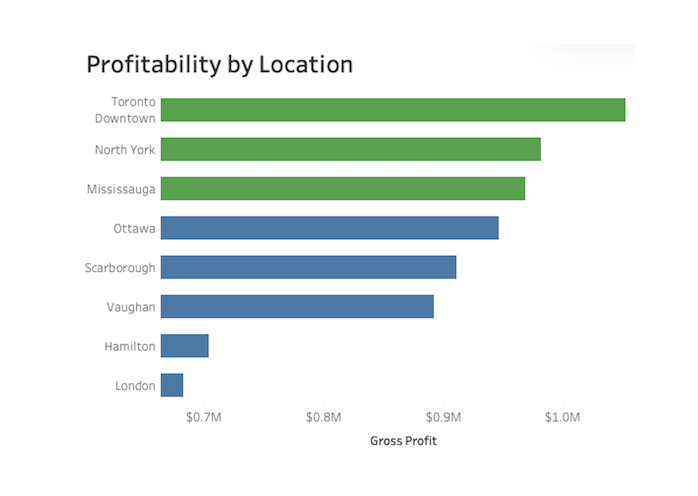
Turning business data into profitability insights
Business-focused analytics using SQL, Python, and Tableau to identify profitability drivers, operational inefficiencies, and decision-ready insights.
View projects →about
Business-focused analytics using SQL, Python, Tableau, and modern BI tools to transform operational and financial data into actionable business insights and executive decision support.
reporting
executive dashboards, KPI tracking
sql
data validation, profitability, cost trends
python
automation, reproducible analysis
business
finance, operations, sales insights
projects
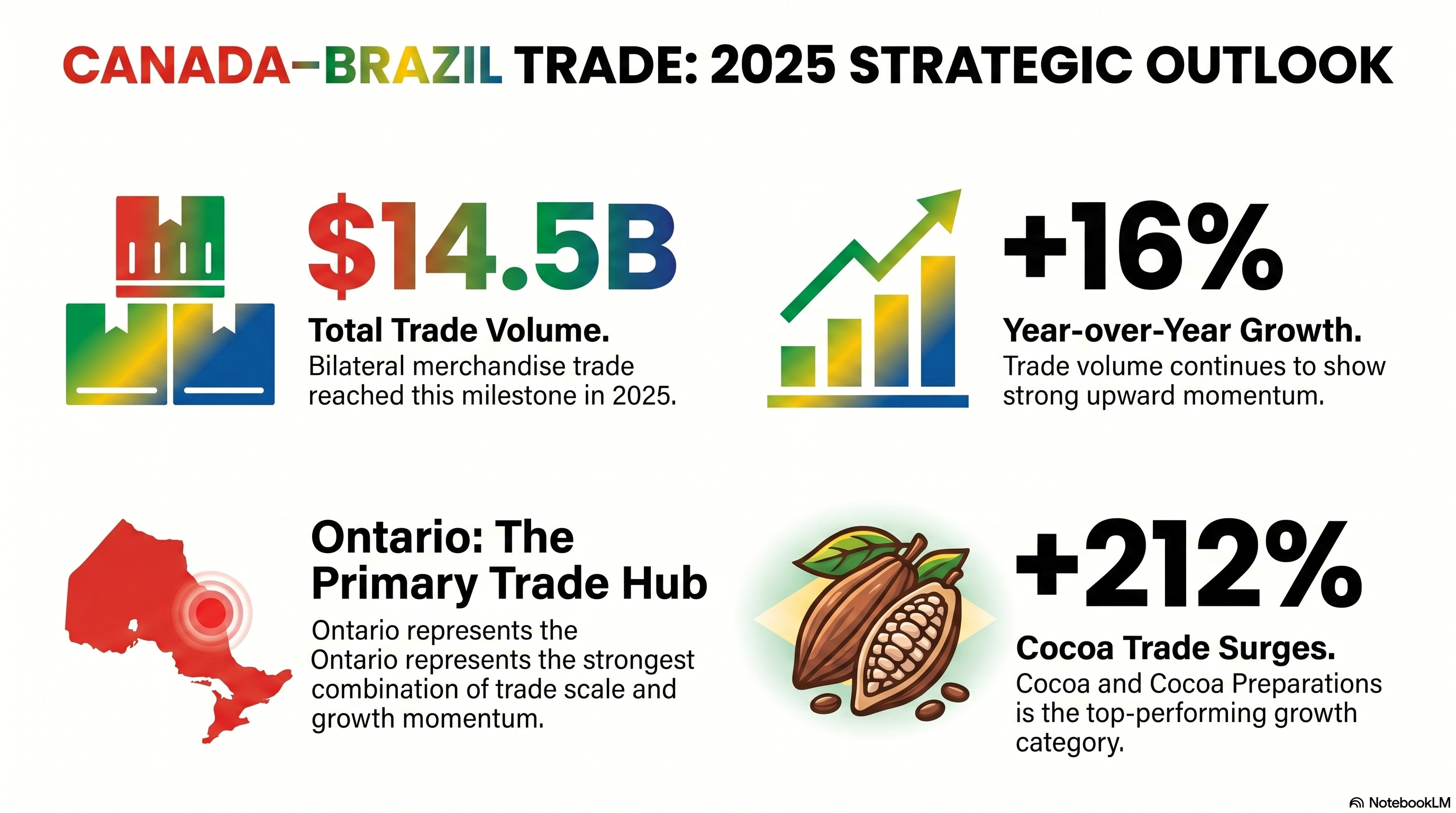
Canada–Brazil Trade Opportunities Analysis
Executive trade analysis prepared for FCBB using Statistics Canada data. The project evaluates bilateral trade performance, product growth opportunities, provincial trade concentration, and 2026 forecasting to support strategic decision-making.
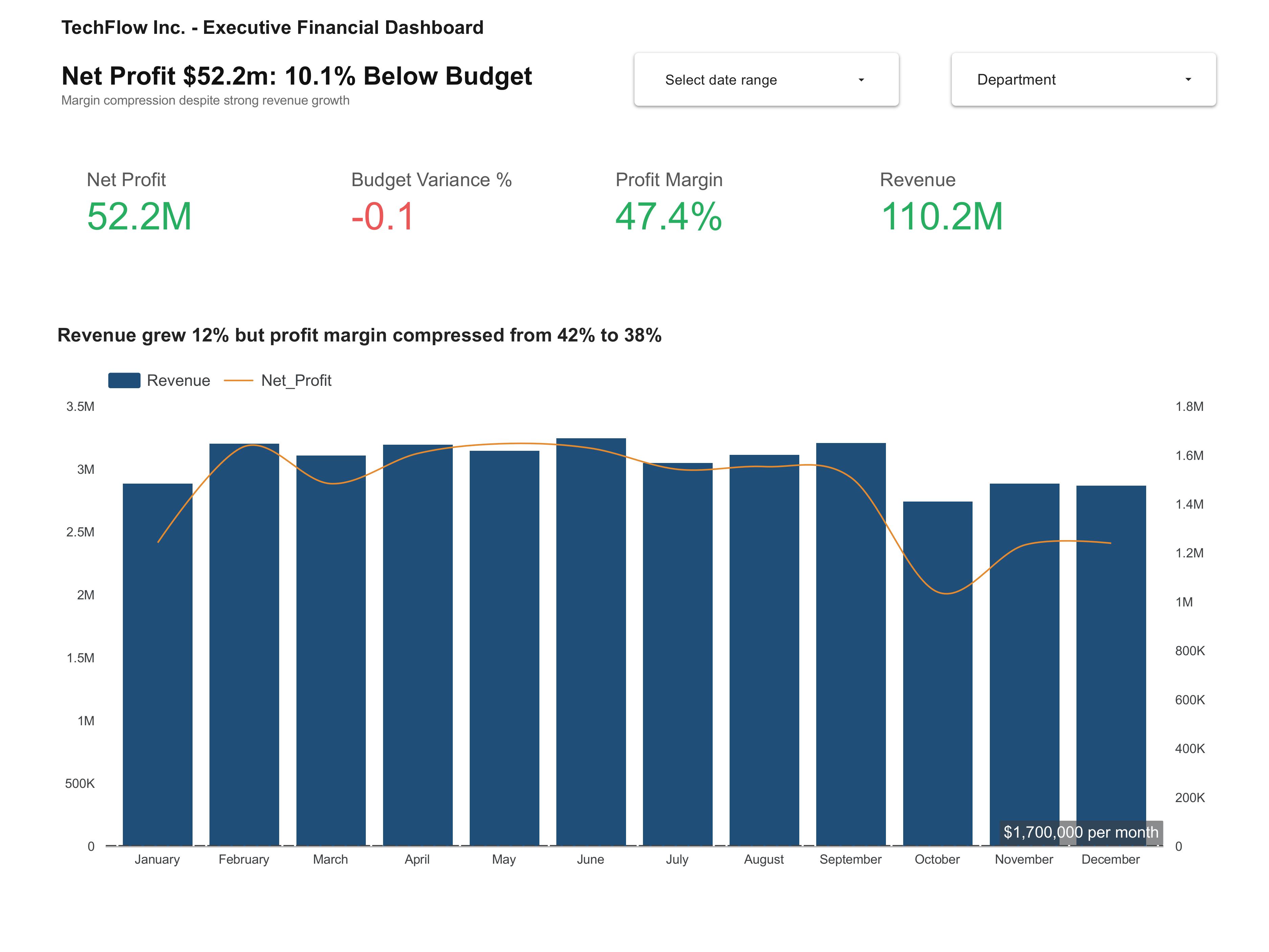
TechFlow Financial
Executive dashboard replacing static reports with revenue and variance views.

Automated Sales Reporting
ETL pipeline automating daily sales and KPI tracking. 85 percent less manual work.


Funding Success Predictor
Deep learning model predicting charity funding success using neural networks.

Home Sales Analysis
SparkSQL, Parquet partitions, cache optimization for real estate insights.

Credit Risk Classification
Supervised ML for loan risk assessment with imbalanced financial data.
notes
📘 beginner sql
Basic SELECT query
SELECT
customer_id,
COUNT(*) as total_orders,
SUM(amount) as total_spent
FROM orders
WHERE order_date >= '2025-01-01'
GROUP BY customer_id
ORDER BY total_spent DESC
LIMIT 10;
🐍 python basics
Pandas filter & groupby
import pandas as pd
df = pd.read_csv('sales.csv')
# Filter rows where revenue > 1000
filtered = df[df['revenue'] > 1000]
# Group by region and calculate average
result = filtered.groupby('region')['revenue'].mean().reset_index()
print(result)
📊 window functions
Running total & ranking
SELECT
date,
product,
sales,
SUM(sales) OVER(PARTITION BY product ORDER BY date) as running_total,
ROW_NUMBER() OVER(PARTITION BY product ORDER BY sales DESC) as rank_in_product
FROM daily_sales
ORDER BY product, date;
🔄 etl pattern
Incremental load
def incremental_load(new_data, existing_table, key_column='id', timestamp_column='updated_at'):
# Get latest timestamp from existing data
latest = existing_table[timestamp_column].max()
# Only get new or updated records
new_records = new_data[new_data[timestamp_column] > latest]
# Append to table
return pd.concat([existing_table, new_records], ignore_index=True)
snippets
📅 date functions
SQL date truncation
-- Group by month, quarter, or year
SELECT
DATE_TRUNC('month', transaction_date) as month,
SUM(amount) as monthly_revenue
FROM transactions
GROUP BY 1
ORDER BY 1 DESC;
🔗 join patterns
LEFT JOIN with COALESCE
SELECT
u.user_id,
u.name,
COALESCE(o.total_orders, 0) as order_count,
COALESCE(o.total_spent, 0) as lifetime_value
FROM users u
LEFT JOIN (
SELECT user_id, COUNT(*) as total_orders, SUM(amount) as total_spent
FROM orders
GROUP BY user_id
) o ON u.user_id = o.user_id;
📈 python visualization
Quick matplotlib chart
import matplotlib.pyplot as plt
import seaborn as sns
# Simple bar chart
df.groupby('category')['sales'].sum().plot(kind='bar')
plt.title('Sales by Category')
plt.xlabel('Category')
plt.ylabel('Total Sales')
plt.tight_layout()
plt.show()
🧹 data cleaning
Handle missing values
# Python pandas - handle missing data
# Fill numeric nulls with median
df['price'].fillna(df['price'].median(), inplace=True)
# Fill categorical with mode
df['category'].fillna(df['category'].mode()[0], inplace=True)
# Drop rows missing critical columns
df.dropna(subset=['customer_id', 'transaction_date'], inplace=True)
resume
📄 resume-julio-carneiro.pdf
download resume